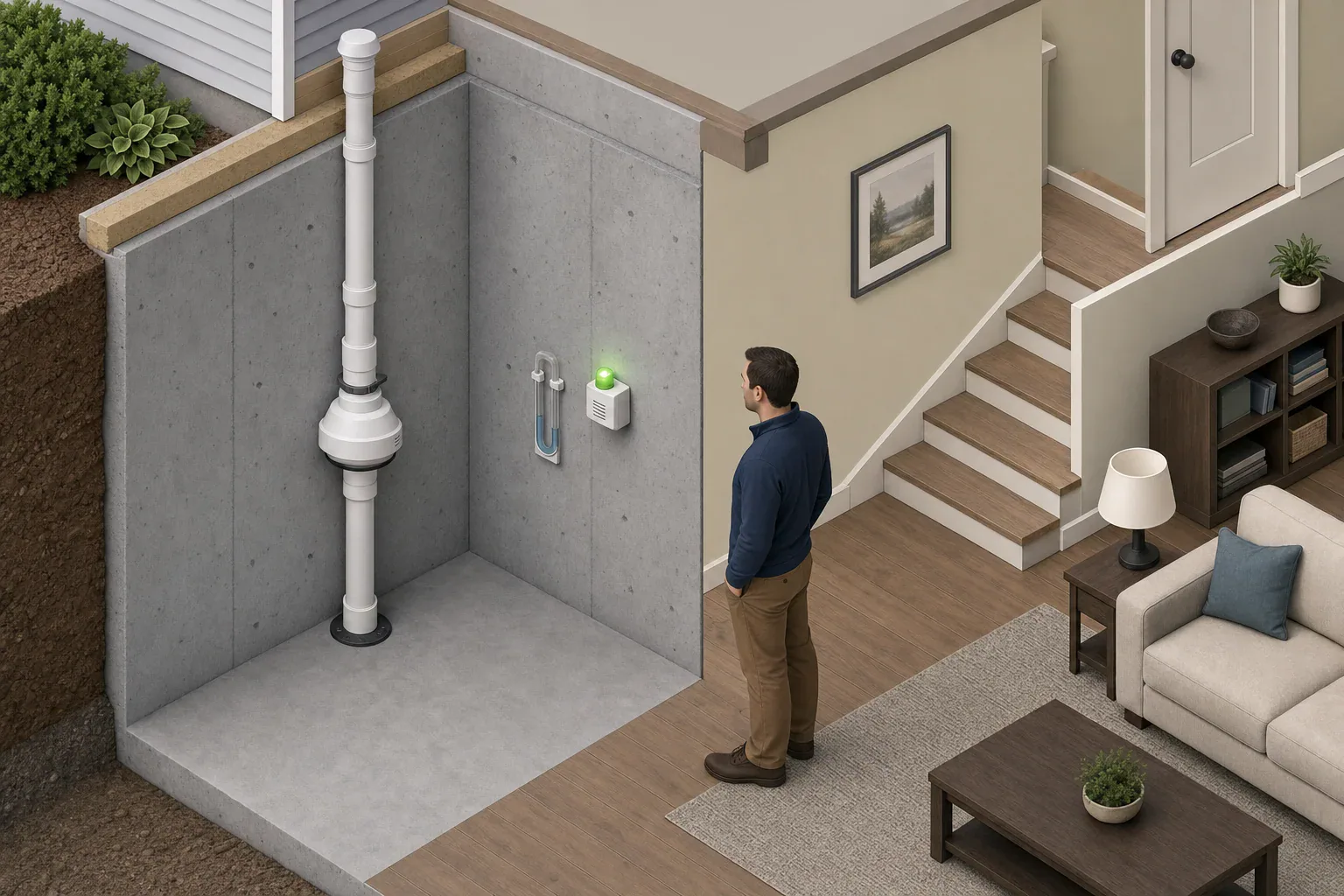
Quick answer: After power returns, check the pressure indicator and alarm against their usual states, listen for the radon fan from a safe location, and confirm any radon monitor is powered and updating. Do not open equipment, alter wiring, or assume a displayed radon number is current immediately after restart.
How to check a radon fan after a power outage
Once ordinary household power has returned, make these observations without opening the fan, removing covers, changing wiring, or climbing to reach equipment:
- Look at the pressure indicator. Compare it with an installer mark, a prior photo, or the normal position recorded on the system label.
- Check the alarm or warning device. Note its light color, flash pattern, sound, and any service message. Use the manual for that exact model to interpret the signal.
- Listen from a safe location. The fan should sound much as it did before the outage, without new rattling, pulsing, vibration, or repeated starting and stopping.
- Check the radon monitor separately. Confirm that it has power and review its connection or last-update status. A displayed number may not be a new reading immediately after a restart.
Do not assume every system restarts the same way. The EPA Consumer’s Guide to Radon Reduction says an active mitigation system’s fan must operate continuously and the system must have an easily seen or heard warning device. If the warning device indicates improper operation, EPA advises calling a contractor.
What normal operation looks like after power returns
Normal is specific to your installation. A useful post-outage comparison is not a universal gauge number or alarm color; it is the condition documented when your system was operating normally.
- Pressure indicator: It is near the usual marked or photographed position.
- Alarm: It shows the normal state defined in its own manual.
- Fan: It sounds familiar, if it is located where it can safely be heard.
- Monitor: It is powered and begins updating or reconnecting as its manufacturer describes.
Keep a photo of the normal pressure-indicator position, the installer’s contact information, and equipment model numbers with household records. That gives you a meaningful baseline for the next outage.
What the pressure gauge can—and cannot—tell you
Many mitigation systems have a U-shaped tube containing colored liquid, commonly called a manometer. It shows a pressure difference at the point where it is installed; it is not a radon detector.
- Uneven liquid columns show a pressure difference at the gauge. Compare their position with your system’s established baseline.
- Equal liquid columns on a typical U-tube mean it is not showing a pressure difference at that point. If your gauge was normally uneven, contact the installer if that condition does not return.
- A changed but nonzero position means the condition at the gauge differs from the prior baseline. It does not by itself identify the cause or prove that the fan has failed.
There is no universal normal manometer reading. Fan model, piping, foundation conditions, and installation details affect the reading. Do not move gauge tubing or adjust the system in an effort to match an old position.
Does fan sound prove the system is working?
No. Familiar fan sound is one useful clue, but it does not measure pipe pressure or indoor radon. Some fans are outdoors, in attics, or otherwise difficult to hear safely. Use the pressure indicator and warning device as additional checks.
A silent fan deserves prompt attention when the pressure indicator also shows no pressure or the alarm reports a problem. New grinding, rattling, strong vibration, or repeated cycling is also a reason to contact the mitigation installer.
Do not open the housing or attempt internal or electrical repairs. The RadonAway Pro Series fan instructions, for example, state that these fans have no user-serviceable parts and require qualified electrical service. Follow the instructions for your own fan model.
How to read alarms and monitor changes
Alarm signals are model-specific
An alarm may monitor pipe pressure, power, battery condition, or its own service status. A chirp does not always indicate the same condition as a pressure alarm. Light colors, flash patterns, test buttons, and alarm delays vary by model.
Check the exact manual before using a reset or test control. For example, the RadonAway RSA1 alarm instructions define model-specific green, red, blue, and yellow light states and selectable alarm delays. Those meanings do not apply to every alarm.
A continuous radon monitor measures something different
A continuous radon monitor estimates indoor radon concentration; it does not confirm that the mitigation pipe has suction. After an outage, a monitor may reconnect, retain or restart an average, show a data gap, or need time before it publishes a new reading. Its behavior depends on the model.
For example, the EcoQube Apex user guide says that model automatically restarts and reconnects to saved Wi-Fi when available. It updates readings about every 10 minutes, and its first chart point appears after about one hour. Those timings apply only to that monitor.
Do not treat a pressure-indicator reading as proof that indoor radon is safe, and do not treat one changed monitor reading as proof of fan damage. Review the monitor’s trend after it resumes according to its manual. EPA does not set a universal post-outage recovery time or an outage length that automatically requires a new radon test.
When to call the installer or an electrician
Contact the mitigation installer when:
- The pressure indicator remains at its no-pressure or failure position.
- The reading does not return near the system’s documented baseline.
- The warning device remains in a failure or service state after any delay specified in its manual.
- The fan is silent while the gauge or alarm also indicates a problem.
- The fan cycles or develops new vibration, rattling, or grinding.
- The fan housing, pipe, coupling, gauge tubing, or another visible system component appears damaged.
If a breaker or other protective device trips again, do not keep resetting it. Leave electrical diagnosis and wiring work to a qualified electrician or the mitigation installer, as appropriate. Do not touch damaged wiring or an open fan housing.
Post-outage household checklist
| Check | Record | Escalate when |
|---|---|---|
| Pressure indicator | Position after power returns; photo from a safe location | It shows no pressure or does not return near the documented baseline |
| Alarm | Light, flash pattern, sound, and time observed | The manual identifies a continuing failure or service condition |
| Fan | Normal, silent, cycling, or newly noisy | Operation differs from its pre-outage condition |
| Radon monitor | Power, connection, last update, and data gap | It does not resume as its manual describes |
| Household power | Approximate outage start and end; any repeated trip | A protective device trips again or electrical damage is visible |
Frequently asked questions
Should a radon fan restart automatically after a power outage?
Some systems may resume when power returns, but restart behavior depends on the fan, power supply, alarm, and installation. Verify the pressure indicator, alarm, fan sound, and monitor status rather than assuming the system restarted.
Should I reset my radon alarm or monitor after an outage?
Do not reset a device just because power returned. First check the manual for the exact model and record the status shown. Some devices use reset controls for testing or configuration, and a reset may clear settings or information.
- Simple checklists and realistic planning
- Water, power, lighting, and pantry basics
- Family plans (kids, pets, seniors) and seasonal prep
Affiliate disclosure
As an Amazon Associate, we earn from qualifying purchases. Some links on this site may be affiliate links. If you buy through these links, we may earn a small commission at no extra cost to you. This helps support our content. Learn more.